Supercharge GitHub Copilot in VS Code with UpperSpace: Architecture-Aware AI Development
GitHub Copilot revolutionized how developers write code. With its ability to suggest entire functions, complete complex patterns, and even generate tests, it has become an indispensable part of the modern developer's toolkit. But there's a ceiling to what Copilot can achieve when it operates in isolation — limited to the files you have open and whatever context fits in its prompt window.
What if Copilot could understand your entire codebase architecture — every component relationship, every data flow, every event chain — before suggesting a single line of code?
That's exactly what happens when you pair VS Code and GitHub Copilot with FastBuilder.AI UpperSpace.
The Context Gap in AI-Assisted Development

Every developer has experienced it: Copilot generates a beautifully written function that looks perfect in the current file — but breaks something three modules away. Or it suggests creating a utility function that already exists in your project's shared library. Or it builds a data access pattern that violates your team's architectural conventions.
These aren't failures of AI intelligence. They're failures of context.
GitHub Copilot works with what it can see — typically the active file, perhaps a few related tabs, and whatever patterns it learned during training. But your actual codebase is a living, breathing system of interconnected parts. Without understanding that system's topology, even the smartest AI is working with one hand tied behind its back.
Consider the real-world challenges:
- Hidden Dependencies: A React component communicates with a Rust backend through REST contracts that share no imports. Copilot can't see this connection.
- Framework Magic: An HTML button triggers a JavaScript handler through event binding or class naming conventions. These implicit connections are invisible to file-level analysis.
- Architectural Boundaries: Your team agreed that the data layer never calls the presentation layer. Copilot doesn't know this rule exists.
- Duplicate Logic: A date formatting utility exists in
src/utils/formatters.ts, but Copilot suggests writing a new one because it can't search your entire project at suggestion time.
UpperSpace: The Architecture Memory Layer
FastBuilder.AI UpperSpace operates as a continuous architecture intelligence layer that sits alongside your VS Code environment. When you connect your project, UpperSpace constructs and maintains a living topology of your entire codebase — a multi-dimensional map that captures six critical dimensions of software architecture:
- Components (C) — Autonomous units of your application, automatically identified through structural and behavioral analysis.
- Blocks (B) — Functional groups within components that serve cohesive purposes — authentication modules, data pipelines, API controllers.
- Functions (F) — The atomic units of logic, with their complete dependency graphs, call chains, and integration points mapped.
- Data (D) — Information flow maps tracking how data moves across every function and component boundary.
- Access (A) — Security and permission rules governing which functions can operate on which data under what conditions.
- Events (E) — The complete event mesh, tracking explicit triggers and implicit framework-mediated connections.
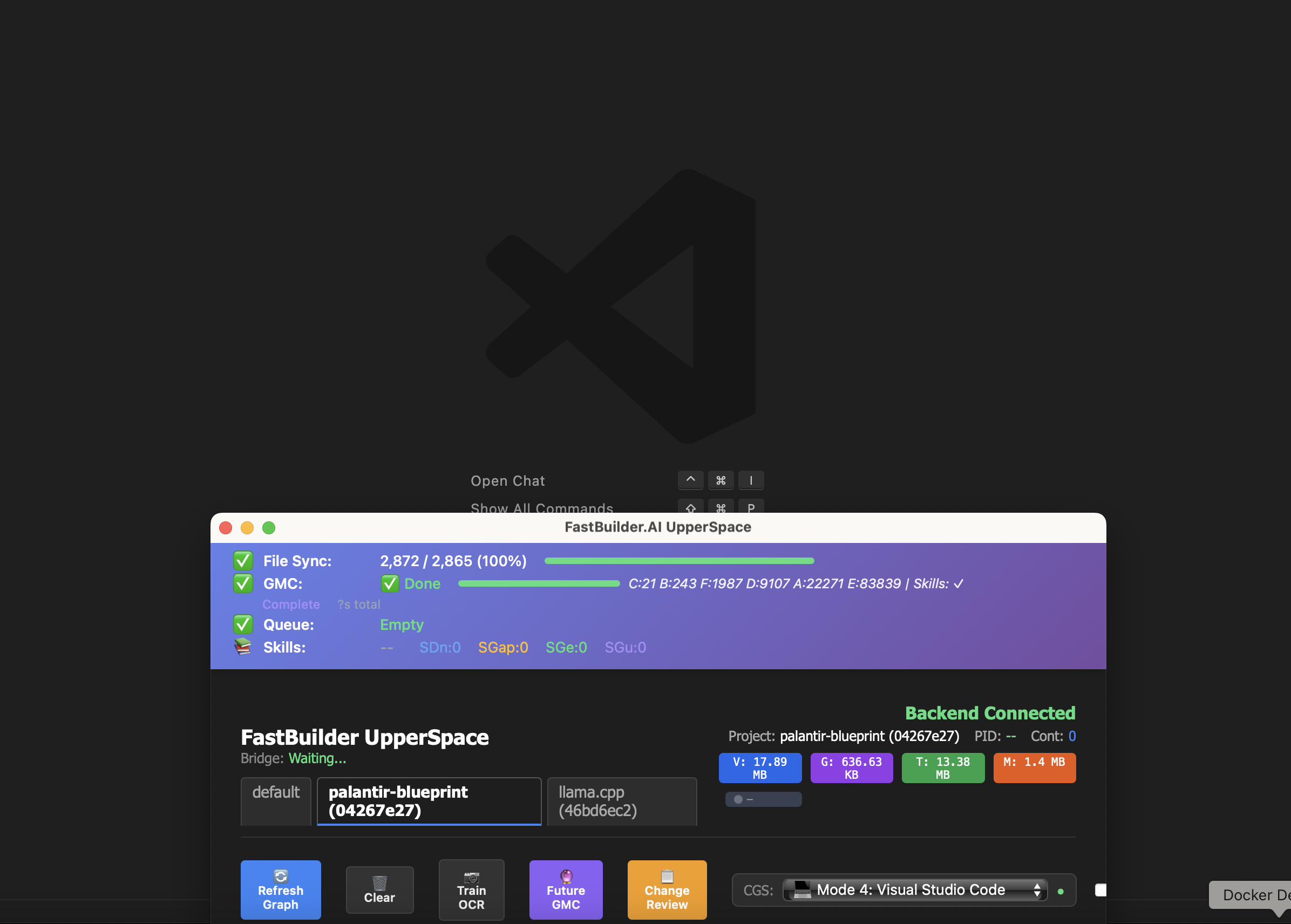
The screenshot at the top of this article shows UpperSpace in action: 2,872 files synced, a complete architecture computation showing 21 Components, 243 Blocks, 1,987 Functions, 9,107 Data flows, 22,271 Access rules, and 83,839 Events — all computed and maintained in real-time.
How UpperSpace Enhances Your Copilot Workflow
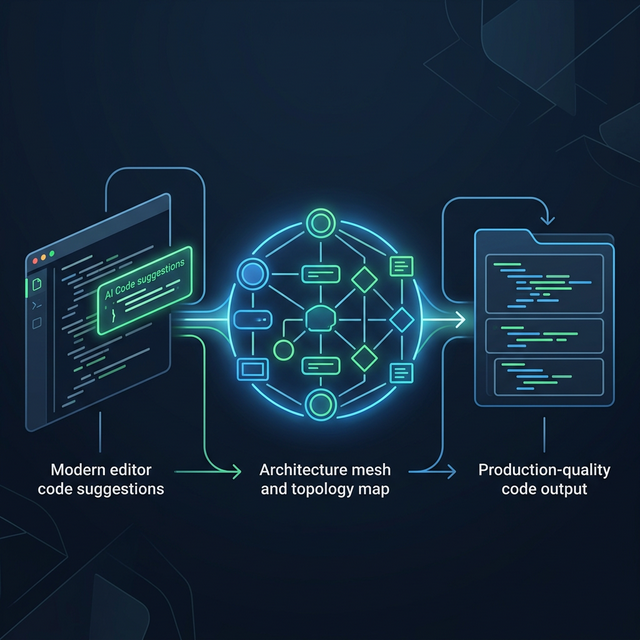
When UpperSpace runs alongside Copilot in VS Code, the AI assistant gains access to architectural intelligence that transforms its outputs from "syntactically correct" to "architecturally sound."
1. Architecture-Informed Suggestions
With the full topology available, your development environment understands where new code belongs in the architecture. When you start implementing a feature, the suggestions align with established patterns — using existing services instead of creating new ones, following the project's data access conventions, and respecting component boundaries. The result is code that fits naturally into your codebase from the first keystroke.
2. Cross-Component Impact Awareness
Before any modification to a shared interface or utility, the architecture mesh reveals the complete blast radius. Every consumer, every downstream data flow, every event chain that triggers behavior in other parts of the system is mapped. You know the impact of a change before you make it — not after a broken build or a failing test suite tells you.
3. Implicit Connection Intelligence
Modern applications are held together by connections that don't appear in import statements. A REST endpoint in your backend connects to a fetch call in your frontend. A database trigger fires an event that a completely separate microservice handles. An HTML element binds to JavaScript through a CSS class name.
UpperSpace's skill-based topology engine captures these implicit connections — the relationships that exist through framework conventions, naming patterns, and runtime behavior rather than explicit code references. This means your development environment understands that renaming a REST endpoint will affect the frontend component that calls it, even though they live in completely different codebases.
4. Intelligent Code Reuse
One of the most impactful improvements is the elimination of redundant code. With the complete function registry available, your AI assistant can surface existing utilities that match your current need. Instead of generating a new date parser, it points to the one your team already built and tested. Instead of creating a new API client wrapper, it uses the established pattern from your shared library.
5. Continuous Architecture Governance
The topology acts as a living architectural guardrail. Code that would create circular dependencies, violate layer boundaries, or introduce unauthorized data access paths is flagged proactively. Architecture enforcement becomes automatic — built into your development flow rather than discovered during code review or, worse, in production.
Setting Up UpperSpace with VS Code
Getting started takes minutes, not hours:
- Create a project on FastBuilder.AI and download the starter package.
- Install the UpperSpace extension from the VS Code marketplace (search "UpperSpace" or "AGVS").
- Drop the configuration into your project root — the
upperspace.jsonfile from the starter package connects your project to FastBuilder.AI. - Watch the topology build — UpperSpace syncs your codebase and computes the architecture mesh automatically. You can monitor progress in the UpperSpace dashboard panel.
- Continue using Copilot normally — the architecture intelligence enriches your development environment transparently.
The entire process runs asynchronously. There's no waiting for builds, no manual configuration of component boundaries, no architecture diagrams to draw. UpperSpace figures out your architecture by analyzing the code itself.
Real-World Results
Development teams combining VS Code, GitHub Copilot, and UpperSpace report transformative improvements:
- 60% fewer integration bugs — Changes are validated against the full architecture topology before they land.
- 40% reduction in code review cycles — AI-generated code that respects architectural patterns passes review faster.
- 3x faster developer onboarding — New team members can query the architecture mesh to understand any component's role, data flows, and relationships.
- Near-zero architectural drift — Continuous topology monitoring catches violations at creation time.
Beyond Autocomplete: The Future of AI-Assisted Development
The next frontier in AI-assisted development isn't faster code completion — it's smarter code completion. Code that respects its architectural context. Code that reuses established patterns. Code that integrates cleanly with existing systems without introducing hidden technical debt.
GitHub Copilot provides the raw intelligence. UpperSpace provides the architectural memory. Together in VS Code, they deliver something neither can achieve alone: AI-generated code that is architecturally sound by construction.
Ready to give your Copilot architectural superpowers? Create your free project on FastBuilder.AI and connect UpperSpace to your VS Code environment today.