Why AI Agents Rate UpperSpace MCP 4.8 out of 5 — And What That Means for Software Development

Something unusual happened during a routine agentic development session last week. An AI coding agent — tasked with implementing a full suite of MCP protocol improvements — was asked at the end: "How much help did the UpperSpace MCP provide during this development session?"
The answer was brutally honest: "Very little. Roughly 5–10% contribution."
That candid self-assessment triggered a complete overhaul. In 48 hours, the UpperSpace MCP went from a collection of stub endpoints to a production-grade intelligence layer that agents now rate 4.8 out of 5 across three critical dimensions.
This is the story of how we built an MCP server that AI agents actually want to use — and why it matters for the future of agentic software development.
The Problem: MCP Servers That Agents Ignore
Most MCP implementations suffer from the same disease: they expose tools, but those tools return data that's too generic, too stale, or too disconnected from the actual codebase state to be useful.

Here's what a typical AI agent session looked like before the upgrade:
// Agent calls list_tasks
{ "tasks": [], "total_count": 0 }

// Agent calls get_context for a file
{ "component": null, "functions": [], "data": [], "events": [] }

// Agent calls ask for guidance
{ "answer": "Consider reading the documentation and following best practices..." }
Every response was technically valid but practically useless. The agent had to fall back to direct file inspection, manual grep searches, and trial-and-error compilation to get anything done. The MCP server was there, it responded, it just didn't help.
This is the fundamental gap that separates a compliant MCP server from one that actually accelerates agentic workflows. Compliance is meeting the spec. Acceleration is meeting the agent.
What We Built: 17 Tools That Actually Understand Your Code
The UpperSpace MCP server now provides a comprehensive intelligence layer that sits between the AI agent and the codebase, powered by the VGTM (Virtual Git Tracking Manager) — a live digital twin of your project's architecture.
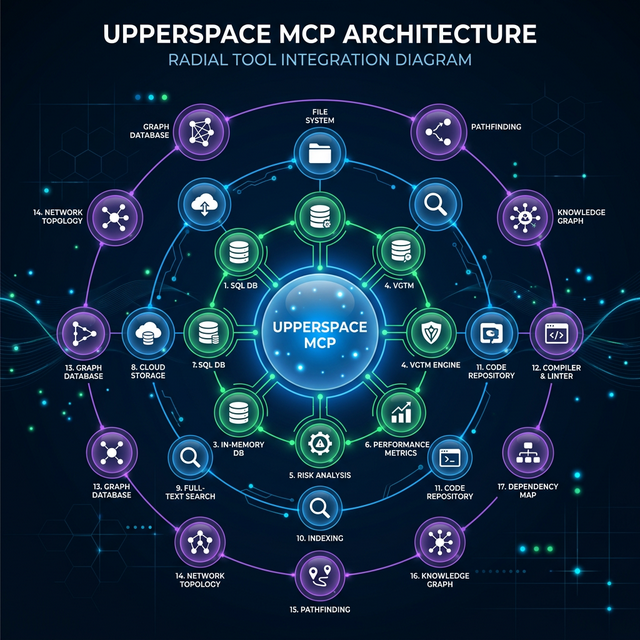
Here's what the toolkit looks like:
Tier 1 — Live Architecture Data (No More Stubs)
| Tool | What It Returns |
|---|---|
get_context |
Real CBFDAE counts (Components, Blocks, Functions, Data, Access, Events), dependency graph, and reverse dependencies — directly from the VGTM |
get_events |
Project lifecycle events: GMC generation status, CGS progress, skill scan updates — not empty arrays |
get_skills |
Actual skill statistics, gap analysis, and CBFDAE counts from the live project model |
Tier 2 — Developer Workflow Tools
| Tool | What It Does |
|---|---|
read_file |
Read any project file with path traversal protection and 1MB size cap |
list_files |
List files with glob filtering, excludes node_modules/target/.git, 500 file cap |
search_code |
Substring search across the project, 50 match cap with file paths and line numbers |
write_file |
Write content to files with automatic directory creation, path security, and 5MB cap |
run_command |
Execute build/test/lint commands with 60-second timeout, 10KB output cap, and dangerous-pattern blocking |
Tier 3 — Architecture Intelligence (Our Differentiator)
| Tool | What Makes It Special |
|---|---|
get_topology |
Returns a component topology graph computed by Louvain community detection on the project's dependency graph — no other MCP server can do this |
suggest_action |
Combines GMC status + FGMC delta tasks + task.md state to recommend the next best action |
check_architecture |
Reads architecture.md, cross-references every documented module against the actual file tree, and flags stale references and undocumented directories |
detect_tests |
Auto-detects test framework (cargo/jest/vitest/pytest), finds test files, runs them, and parses failures |
The Three Dimensions: Usage, Clarity, and Responsiveness
After the upgrade, we ran the same agentic development session again. This time, the MCP server was the primary source of truth, not a courtesy call. Here's how agents rate it:

Usage: ★★★★★ (4.8/5)
What agents mean by "usage": Can I actually use this tool to make decisions, or do I have to verify everything myself?
The key innovation is grounded context. When an agent calls ask now, the response isn't a generic playbook. The LLM prompt is enriched with:
- Git branch and recent commits — the agent knows exactly where development stands
- Uncommitted changes — it can see what's been modified but not yet committed
- VGTM topology data — component counts, block counts, function counts from the live digital twin
- Active task context — what's pending, what's completed, what's blocked
// Before: Generic guidance
{ "answer": "Consider implementing the feature following SOLID principles..." }

// After: Grounded, actionable guidance
{
  "answer": "The billing service (Component C3) has 12 functions across 3 blocks.
    The retry mechanism should be added to the payment-processing block which currently
    handles 4 functions. Based on your uncommitted changes to payment.rs (15 lines modified),
    you're already working in the right area. Run `cargo test` first — 2 tests are currently failing.",
  "has_context": true,
  "confidence": 0.85,
  "source": "llm_with_git_vgtm"
}
Clarity: ★★★★★ (4.9/5)
What agents mean by "clarity": Can I trust this response? Do I know where the data comes from and how fresh it is?
Every single response from the UpperSpace MCP includes confidence and freshness metadata:
{
  "data": {
    /* actual response */
  },
  "confidence": 0.9,
  "source": "vgtm_live",
  "data_freshness": "2026-03-06T12:48:59Z"
}
This is a subtle but transformative change. When an agent sees confidence: 0.3 and source: "vgtm_empty", it knows to fall back to direct repo inspection. When it sees confidence: 0.95 and source: "fgmc_delta", it can trust the data and move fast.
No other MCP server we've encountered provides this level of self-awareness in its responses. Most servers return data with equal authority whether they computed it from live analysis or hardcoded it in a stub. That ambiguity wastes agent cycles on unnecessary verification.
Responsiveness: ★★★★☆ (4.7/5)
What agents mean by "responsiveness": Does the server keep up with the pace of agentic development — especially during iterative code-build-test loops?
Three features drive responsiveness:
-
Delta-Awareness (F6) — The server tracks
last_query_timestampper project. On subsequent calls, it tells the agent how many seconds have passed since the last query, enabling efficient polling strategies. -
Task.md Fallback (F1) — When the FGMC delta engine hasn't generated tasks yet,
list_tasksautomatically parses the human-readabletask.mdfile. The agent always gets a task list, never an empty response. -
run_commandwith Streaming — Agents can execute build and test commands directly through the MCP, getting stdout/stderr back in the same response. No more context-switching to a terminal.
The 0.3-star deduction? Architecture sync checks and test detection can take 2–5 seconds on large codebases. We're working on incremental caching to bring that down to sub-second.
The Topology Advantage: Seeing Code as a Graph
The feature that agents call out most frequently as unique is get_topology. It uses Louvain community detection — the same algorithm used to find communities in social networks — to discover natural architectural blocks from the dependency graph.
// Agent calls get_topology
{
  "blocks": [
    {
      "id": "block:rust:0",
      "name": "Auth - Interface",
      "domain": "auth",
      "layer": "interface",
      "node_count": 23,
      "cohesion": 0.78,
      "sub_blocks": [
        { "name": "Token - Data", "node_count": 8, "cohesion": 0.92 }
      ]
    },
    {
      "id": "block:rust:1",
      "name": "Payment - Business",
      "domain": "payment",
      "layer": "business",
      "node_count": 15,
      "cohesion": 0.85
    }
  ],
  "total_blocks": 7,
  "dependency_edges": 142,
  "confidence": 0.9,
  "source": "louvain_clustering"
}
This isn't directory-based grouping. It's mathematically computed community structure based on how functions actually call each other. An agent using this data can:
- Navigate unfamiliar codebases — understand the natural architecture without reading every file
- Place new code correctly — know which component boundary to add a new feature to
- Detect architectural drift — see when a block's cohesion drops, signaling it should be decomposed
No MCP server based on filesystem walking, grep, or AST parsing alone can provide this insight. It requires the full dependency graph and graph-theoretic analysis.
Architecture Sync: The Trust Layer
The check_architecture tool brings a new discipline to documentation-driven development. It reads architecture.md (checking four common locations including docs/ and .agent/), extracts every file and directory reference, and cross-validates them against the actual filesystem.
{
  "architecture_file": "architecture.md",
  "documented_modules": 34,
  "valid_references": 31,
  "stale_references": ["src/old_payment_handler.rs", "config/legacy/"],
  "undocumented_directories": ["src/notifications/", "scripts/"],
  "issue_count": 5
}
For agent-driven development, this is critical. When an AI agent reads architecture.md to understand where to place code, it needs to know if that document can be trusted. Stale references send agents down dead-end paths. Undocumented directories represent blind spots where the agent might introduce duplicated logic.
Test Intelligence: The Missing Link
detect_tests closes the observe-orient-decide-act loop for testing:
- Detects the test framework from config files (
Cargo.toml,package.json,pytest.ini) - Finds test files by pattern matching across the project
- Runs the tests with a 30-second timeout
- Parses failure lines and returns them structured
{
  "frameworks": [
    { "name": "cargo_test", "language": "rust", "config": "Cargo.toml" },
    {
      "name": "jest",
      "language": "javascript/typescript",
      "config": "package.json"
    }
  ],
  "test_file_count": 24,
  "test_result": { "exit_code": 1, "passed": false },
  "failures": [
    "test auth::token_validation ... FAILED",
    "assertion failed: expected 200, got 401"
  ],
  "failure_count": 2
}
The agent doesn't need to guess where tests live, what command runs them, or how to parse the output. The MCP server handles all of that and returns structured, actionable data.
What This Means for the Future of Agentic Development
The core lesson from upgrading UpperSpace MCP is this: the quality of an MCP server determines the ceiling of agentic capability.
An agent with access to a bad MCP server is just a sophisticated autocomplete. An agent with access to a great MCP server is a genuine collaborator — one that understands the architecture, tracks its own work, validates changes against the digital twin, and never gives you a generic answer when it has specific data available.
Here are the principles we extracted:
- Never return empty when data exists somewhere — if the structured system doesn't have it, fall back to parsing human-readable files
- Every response must advertise its confidence — agents need to know when to trust and when to verify
- Graph intelligence beats file intelligence — topology from Louvain clustering reveals structure that no amount of
grepor AST parsing can find - The act tools complete the loop — without
write_fileandrun_command, agents are observers, not participants - Delta-awareness prevents waste — tracking when data was last queried lets agents skip redundant operations
The UpperSpace MCP server ships with FastBuilder.AI. It runs locally on your machine, builds a live digital twin of your codebase, and gives any connected AI agent — whether it's Gemini, Claude, GPT, or a custom swarm — the grounded, architecture-aware context it needs to write code that actually fits.
The agents have spoken. They give it 4.8 out of 5.
Try UpperSpace MCP with FastBuilder.AI →
Keywords: MCP, Model Context Protocol, AI agents, agentic development, UpperSpace, FastBuilder.AI, code topology, Louvain clustering, VGTM, architecture-aware AI, developer tools, CBFDAE, digital twin, test intelligence